The GeoDT Dashboard with OGS Project File Viewer and Hover Mode
As part of the GeoDT project, the existing dashboard has received a major upgrade: users can now visualize and edit OGS project files directly in the browser. When a file opens, the complete source code is displayed first, while all grids linked in the project file load and highlight in different colors. The user can modify the source code, such as adjusting boundary conditions, replacing grid structures, or resetting parameters, and immediately see the visual effect of their changes. As soon as the user saves and applies changes, the affected grids automatically reload, so the dashboard updates immediately. This direct feedback loop shortens iteration cycles and brings the digital twin one step closer to seamless simulation launches.
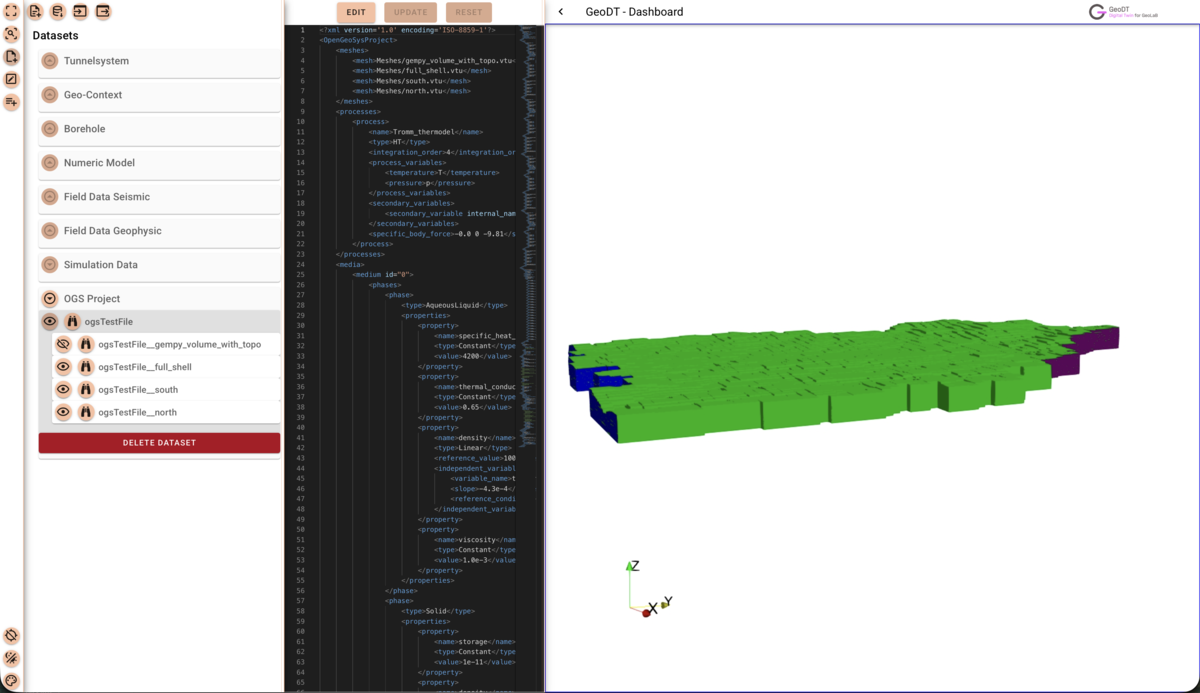
Representation of a loaded OGS project file, including the source code and the linked grids.
In addition, we expanded the analysis functionality: a new hover mode displays context-sensitive information as soon as the mouse hovers over a grid element, showing cell IDs, material properties, and result values. The combination of a source code editor, a color-coded grid display, and an interactive hover info panel enhances analysis capabilities, and gives domain experts a powerful tool for fast, error-resistant modeling.